Describe one moment clearly
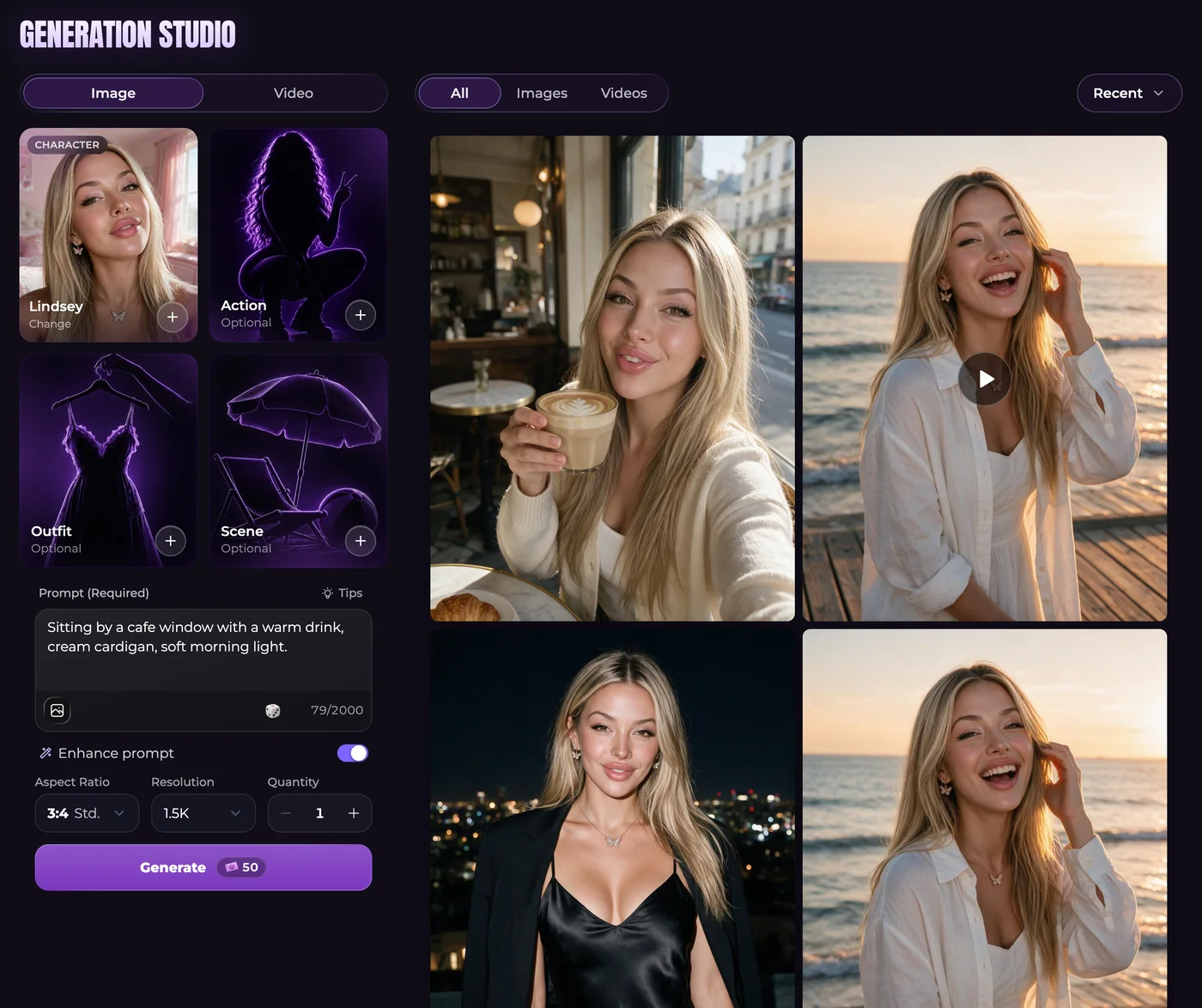
In Generate, choose Image and select the companion. Available Action, Outfit and Scene presets can supply part of the description, but you can leave them empty. Keep their choices consistent with your words: a selected indoor setting and a request for a mountain trail give the image model conflicting instructions.
Try an ordinary fictional scene, such as a companion arranging flowers at a market stall, wearing a green raincoat under an awning. Decide whether you want a close portrait or a wider view. That makes the action and composition easier to describe without repeating vague requests for quality.
Choose the visual reference and image shape
Advanced generation accepts up to five photos from your Secrets gallery. One reference is included in the base price; each additional photo adds 10 Moments. Pick references for the particular features, clothing or setting you want to carry forward. They guide the result rather than guaranteeing an identical image.
Aspect ratio determines the picture's shape. Resolution controls its dimensions, with Advanced options of 1K, 1.5K and 2K. Quantity requests more results. In chat photos, Lock appearance determines whether later pictures can reflect appearance changes established in your story.
Review the picture and choose the next action
Open the finished image rather than judging only its thumbnail. Check the expression, hands and background. You might keep it, download it, make a focused edit or turn it into a video. A new generation and an edit are separate requests, so inspect their prices before proceeding.
A standard single-companion chat photo costs 50 Moments. Group photos, persona photos and higher-resolution requests have different totals. Read the amount on Generate after setting size, quantity and references; an unlimited text plan does not make those requests unlimited.
Questions and answers
Can my companion send a picture while we talk?
Yes. Ask for a photo or use the instant-image control. The conversation supplies the scene, with supported appearance settings guiding the companion's look.
How many companions can appear together?
Studio supports up to three companions in a group image. When an Ultimate persona is included, the limit remains three people altogether.
Why does a V2 character have no image-mode selector?
V2 companions generate in Advanced automatically. You do not need to activate another mode before using them in Studio.
Does unlimited messaging pay for my pictures?
No. Text access and image spending are separate. Check the request's Moments total and your account eligibility before generating.